
Classroom Technology guides have moved to teach.usu.edu, a new hub for all teaching resources. Please visit that site for up-to-date guides and resources. The guide below is no longer being updated.
Info
Many classrooms at Utah State University have a document camera. Document cameras are great for displaying books, objects, and written material.
How to Use:
USB Doc Cams
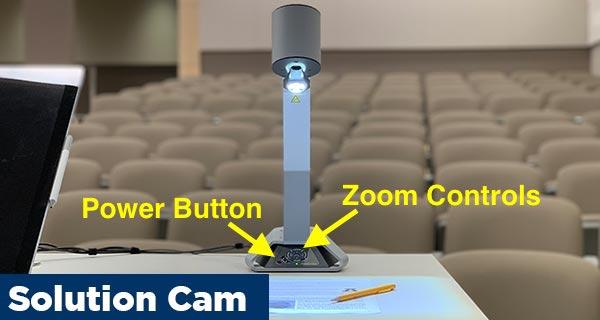


- Power on the document camera using the power button on the base. If power button is red, the document camera is off. If purple, it's booting up. If blue, it's on and ready.
- On the classroom computer, double click the "IM" (Image Mage) shortcut on the desktop to display the document camera.
- Zoom the camera in and out using the zoom controls on the side of the document camera arm.
- Other controls, including lighting options, are found on the base of the document camera.

- Power on the document camera using the power button on the base.
- On the classroom computer, double click the "Document Camera" shortcut on the desktop to display the document camera.
- Zoom the camera in and out using the zoom controls on the base of the document camera arm.
- Other controls, including lighting options, are found on the base of the document camera.

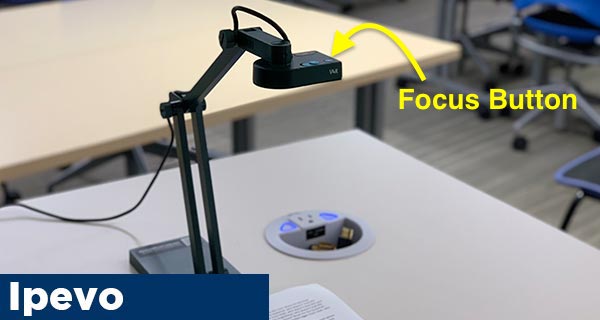
- The Ipevo document camera does not need to be powered on and should be ready to use.
- On the classroom computer, double click the "Document Camera" shortcut on the desktop to display the document camera.
- There are no zoom controls on the Ipevo document camera. Should the need to zoom in arise, simply move the document camera head closer to the document/object.
- To focus, press the focus button on the head of the document camera.
Ceiling Doc Cams

- Select Doc Cam on the Crestron Touch Panel. Controls for the document camera will show on the Crestron touch Panel.
- Use the controls to zoom the camera in and out, adjust focus, and set presets.
FAQ
FAQ
Ensure the document camera is powered on. Tabletop document cameras often need to be turned on before using. Look for a power button on the base of the document camera. If the document camera is on but is not displaying any video, contact us and we will send someone to help.
USB Doc Cams: Yes! Because USB document cameras run through the classroom PC, simply ensure Kaltura is set to record the PC screen and it will record the document camera as well.
Ceiling Doc Cams: It depends on the room. Most IVC/Broadcast classrooms support this. Call or chat with us and we'll help, or you can request training by clicking the "Request Training" button below and we'll schedule a time to look at this together.