
Helpful Room Hints
Window Screens
The windows have shades/screens that can be lowered or raised in the room. The button is located near the instructor desk at the front of the room.
XPanel
The xPanel for this classroom has been added to the Facilitator computer, but you can only access it by logging into the Facilitator account on the computer. Please visit the Access Codes page of the scheduler to view the username and password used to log into the Facilitator account on the facilitator computer.
Power Outlets
Power outlets can be found on the floor by the student desks.
How to setup the Codec Video Layout Page for both receive and origination classes:
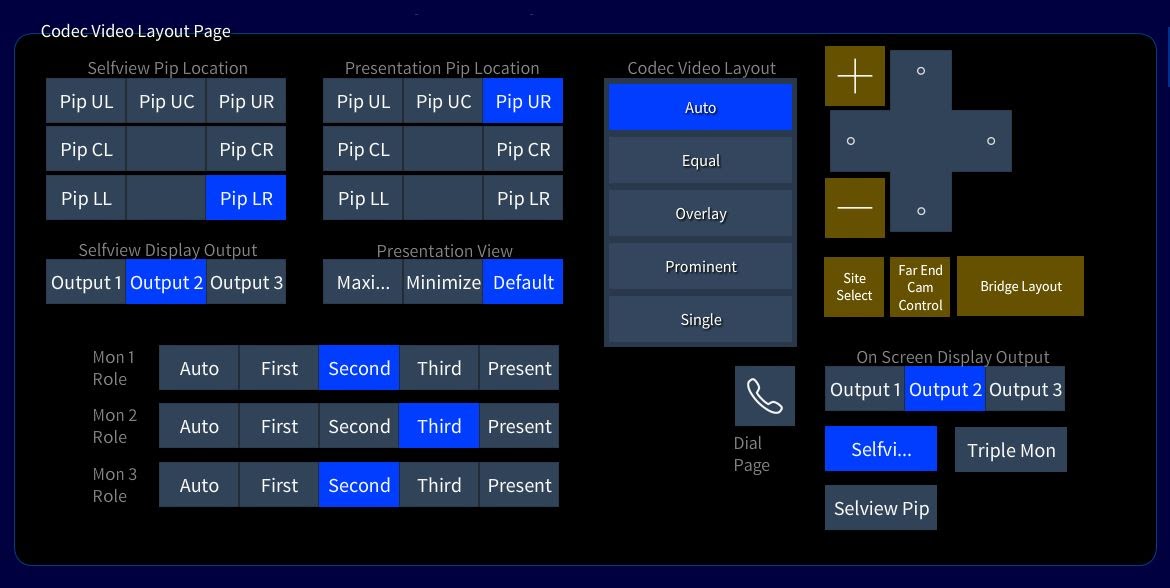
If you'd like to see the selfview on the facilitator monitor, switch Monitor 3 Role to First and make sure the selfview is turned on. This will remove the sites from your monitor, but you will be able to control the cameras in the room easier.
Known Issues
Additional Information
Student View:
Instructor View:
Location:
On This Page

Quick Facts
| Room Type: | Classroom |
| Codec: | SX80 |
| Student Mic: | Ceiling |
| Facilitator Ctrl: | SCCE xPanel |
| Doc Cam: | Ceiling |