Helpful Facilitation Hints
Andy Anderson courses are very unique courses. Professor Anderson is an amazing and well-known professor but he prefers to focus solely on teaching instead of technology. He hires facilitators with out-of-pocket money to run the technology while he teaches. This includes ensuring the lectures are properly recorded via Kaltura Classroom, running the PowerPoint and other technology features of the lecture, and managing the face-to-face classroom touch panel.
Room Set-Up:
As with any other course you are facilitating, please arrive 10-15 minutes before the class begins. Once there, you will want to sign into the scheduler and slack on your own laptop. Sign into the instructor computer and test the audio to make sure the audio is working for videos. Check to make sure the instructor mic is being picked up on Kaltura as well. If the battery level is below 2 bars, please start a chat. Turn on the equipment and lower the projector screen.
Kaltura Classroom:
Open up Kaltura Classroom and make sure the sources are correct. (Input 1 should be the instructor camera and Input 2 should be the desktop). Turn off the instructor camera source by selecting the camera icon by Input 1. Again, check to make sure the mic levels move up and down in Kaltura. If these are not on the correct sources, please use the toggles to change the inputs (indicated in the picture below in red circles). Once the recording is started, you will not be able to change the inputs.
The recording should start automatically. Please check to see if there is a countdown on the left, next to the calendar icon and make sure the recording starts when it is supposed to. If you do not see a countdown 10 minutes before the start of the recording, please start a chat.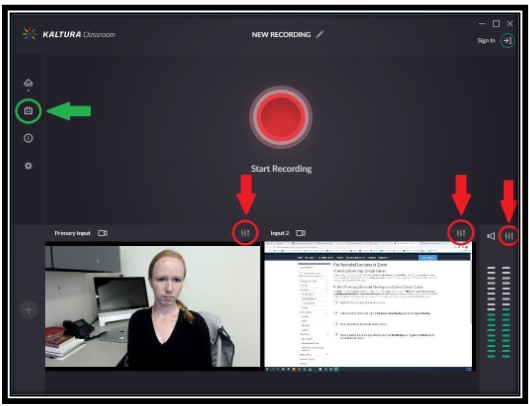
Facilitator Duties:
When Andy Anderson arrives, he will hand you his flash drive before class. Plug it into the computer and pull up his PowerPoint for the day (it will be labeled with the course name). When he starts class, he will begin presenting and say "Next" at which point he wants you to advance to the next slide.
After Class:
When class is completed, clean up the room as normal (instructor mic in the charging station, projector off, screen raise, etc.). Additionally, make sure you have logged out of the instructor PC.
AggieTime:
Since Andy Anderson pays out-of-pocket for assistance in these courses, you will log your time differently than when facilitating Connect or Concurrent Enrollment classes. In the 'Project' section of AggieTime, please write "Andy Anderson Course" instead of the individual class name. This helps the University know how much to charge him for the facilitators he is using.
Known Issues
If the audio isn't working in Kaltura, try cycling through the other input sources for audio. You can also try quitting the application and opening it up again. If neither of these work, please start a chat.